VoiceIsle › Voice Isolation: Android vs iPhone
Across the fence
Voice Isolation on Android vs iPhone: what each phone calls it

Is there Voice Isolation on Android? Not by that name. Voice Isolation is Apple's label for the iPhone's call-noise setting. Android phones have their own versions, named by each maker: on a Google Pixel it is Clear Calling, and on a Samsung Galaxy it is Mic mode, where the option to pick is Voice focus. They do a similar job, live in different places and cover different kinds of calls.
This page puts the phones side by side: what each is called, where the switch is, and which calls it reaches. We only list brands whose own help pages we could read; for other Android phones, see the note near the end. Everything here is a free, built-in setting; no app to install on either side.
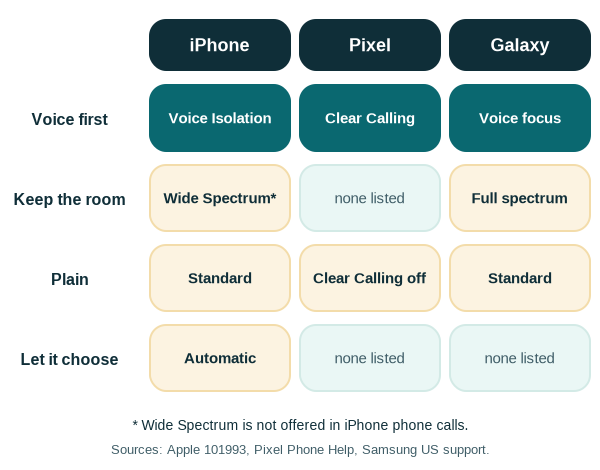
From Apple doc 101993, Google's Pixel Phone Help and Samsung's US support page.
Side by side: names, switches and which calls
| iPhone | Google Pixel | Samsung Galaxy | |
|---|---|---|---|
| The voice-first setting | Voice Isolation | Clear Calling | Voice focus (in Mic mode) |
| Keep-the-room option | Wide Spectrum, not in phone calls | None listed | Full spectrum |
| Where you switch it | During the call: Control Center → [App] Controls → Mic Mode | Settings → Sound & vibration → Clear Calling, or mid-call: Volume button → Clear Calling | During the call: two-finger swipe down → Mic mode at the top → pick → Done |
| Phone calls | iOS 16.4 or later | Pixel Phone app, Pixel 7 and later | Samsung Phone or Contacts app, select newer models |
| Internet (VoIP) calls | FaceTime and certain third-party apps, iOS 15 or later | VoIP apps on Pixel 10 and later, except Pixel 10a | VoIP apps when on speakerphone |
| Remembers your choice | Yes, per app | An on/off switch in Settings | Not stated |
Read the table by row, not by brand. The biggest practical difference is the switch itself: on iPhone and Galaxy it is a menu you usually open during the call, while on a Pixel it is a setting you turn on once in Settings (with a mid-call shortcut). The second difference is which calls are covered, and that is where most "it doesn't work on WhatsApp" questions come from.
iPhone: Voice Isolation, from Control Center
Apple's support document describes Voice Isolation as the mode that “prioritizes your voice and blocks ambient noises.” You choose it during a call or recording: open Control Center, tap [App] Controls, and under Audio & Video select a Mic Mode. The same menu holds Standard, Wide Spectrum (never in phone calls) and, from iOS 18, Automatic. Phone calls need iOS 16.4 or later; FaceTime and certain third-party apps iOS 15; recording apps such as Voice Memos iOS 26. Supported iPhones start at iPhone XR and the XS models.
One detail that sets it apart from both Android versions: the choice is remembered per app, so Voice Isolation picked during one WhatsApp or FaceTime call is already on for the next call in that app. The full iPhone walk-through is in our Voice Isolation on iPhone guide.
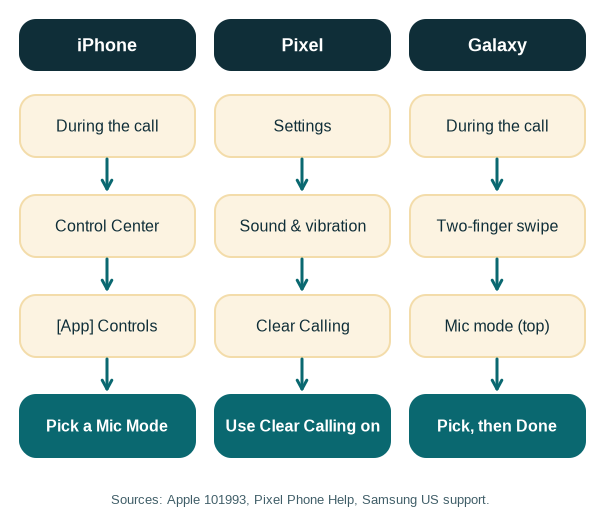
From Apple doc 101993, Google's Pixel Phone Help and Samsung's US support page.
Google Pixel: Clear Calling
Google's Pixel Phone Help says Clear Calling “filters background noise so people can hear you clearly.” To turn it on, open Settings, tap Sound & vibration, then Clear Calling, and switch on Use Clear Calling. During a call there is a shortcut: press a Volume button and tap Clear Calling in the panel that opens. Google adds that all sound data is processed on the phone and is not sent to Google.
The limits are model-based. Clear Calling in the Pixel Phone app needs a Pixel 7 or later. In internet-calling (VoIP) apps it is supported on Pixel 10 and later, except the Pixel 10a; Google separately notes that some third-party apps on the Pixel 8 and 8 Pro support it for Wi-Fi calls. It also depends on call bandwidth, so it may not be available on every call. Interestingly, Google also suggests it for muffling background music such as hold music, which is sound reaching you rather than leaving your phone; Apple makes no such claim for Voice Isolation.
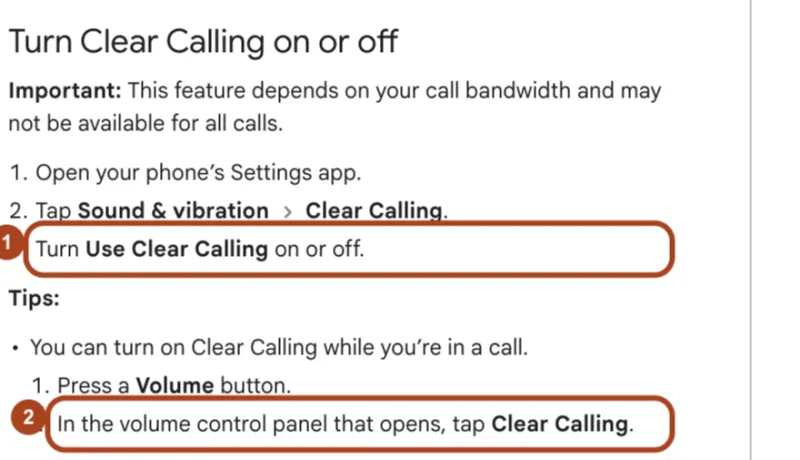
Our screenshot of Google's public Pixel Phone Help page Turn on Clear Calling, captured 3 November 2026. Page content © Google; the numbered boxes are ours.
Samsung Galaxy: Mic mode, with Voice focus and Full spectrum
Samsung's version is the closest match to Apple's, down to the menu shape. Its US support page says Mic mode lets you tune the microphone during calls, optimising the frequencies the phone transmits while decreasing background sounds. Begin a call, swipe down from the top of the screen with two fingers to open the Quick settings panel, tap Mic mode at the top, choose an option and tap Done. The options are Standard (“minimal audio filtering”), Voice focus (“increased audio filtering”) and Full spectrum, which “captures voice and background sounds.”
That makes the translation easy: Voice focus is Samsung's Voice Isolation and Full spectrum is Samsung's Wide Spectrum (the comparison of Apple's pair is in Wide Spectrum vs Voice Isolation). The catch is coverage. Samsung lists Mic mode for regular cellular calls in its own Phone and Contacts apps on “select newer” Galaxy phones and tablets, and for VoIP apps only on speakerphone. On some earlier models, including the S21 and S22 series, several Z Flip and Z Fold generations and the Tab S8 and S9, it works only on speakerphone in VoIP apps. If Mic mode never appears, Samsung's answer is that your device doesn't support it.
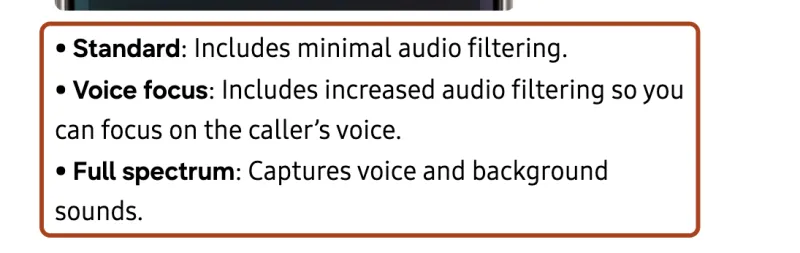
Our screenshot of Samsung's public US support page Change the microphone mode, captured 3 November 2026. Page content © Samsung; the box is ours.
On a call between an iPhone and an Android phone
Each of these settings works on its own phone's microphone, so the two ends are independent. Apple says your Mic Mode affects only the app you're using on your iPhone; Samsung describes Mic mode as shaping what the Galaxy transmits. In practice: if you're on an iPhone and the other person is on Android, your Voice Isolation cleans what your iPhone sends, whatever phone they hold. If their side is the noisy one, the switch they need is on their phone: Clear Calling on a Pixel, Mic mode on a Galaxy.
For calls in apps such as WhatsApp, coverage differs by phone. On iPhone, Apple lists mic modes for “certain third-party apps” without naming them, and its iPhone User Guide notes Wide Spectrum isn't available for all apps; the test is to open Control Center during that app's call and see whether a Mic Mode menu appears. On a Galaxy, Samsung covers VoIP apps on speakerphone. On a Pixel, Google lists VoIP support from Pixel 10 (not 10a). If the menu is missing on an iPhone, our not-working checklist goes through the causes in order.
Other Android phones
Other Android makers ship call-noise features too, under their own names, but we have not listed any whose wording we couldn't read on the maker's own help pages. If you have a phone from another brand, look in the in-call screen and in the phone app's settings for an option mentioning noise or voice, and check that maker's support site for the current name and which models have it.
How we checked this
We read Apple's mic-mode support document 101993 and the iOS 27 iPhone User Guide page on call audio, Google's Pixel Phone Help page on Clear Calling, and Samsung's US support page on Galaxy Mic mode, all on 3 November 2026, and re-read them on 5 November 2026 without finding a change. The table and both charts repeat what those pages say; feature names are the makers' own.
We did not test any of these phones or compare how they sound, and we make no claim about which one removes more noise. The screenshots are of the makers' public help pages. How the VoiceIsle desk handles facts is on our about page.
Quick answers
Is there Voice Isolation on Android?
Not under that name. Google Pixel phones have Clear Calling, and Samsung Galaxy phones have Mic mode with a Voice focus option. Both are built in and free.
Is Samsung's Full spectrum the same as Apple's Wide Spectrum?
They match in purpose. Samsung says Full spectrum captures voice and background sounds; Apple says Wide Spectrum leaves ambient noises unfiltered. One difference: Apple doesn't offer Wide Spectrum in phone calls.
Does Voice Isolation work on WhatsApp calls on iPhone?
Only if the app supports Apple's mic modes. During the call, open Control Center and tap the app's controls: if a Mic Mode menu appears, you can pick Voice Isolation there.
I'm on iPhone and they're on Android. Who should switch it on?
Whoever is in the noisy place. Each setting cleans the microphone on its own phone, so your Voice Isolation helps them hear you, and their Clear Calling or Voice focus helps you hear them.
On a Mac as well? See Krisp for Mac users.