VoiceIsle › Voice Memos transcripts
The recording file
How to transcribe Voice Memos on iPhone and Mac, without another app

Read against Apple's Voice Memos guides for iPhone and Mac, the Notes audio guide and Apple's mic-mode document.
You don't need an upload site or a paid transcriber: Voice Memos already transcribes speech on its own, on iPhone 12 or later and on the Mac. Open a recording, tap the more button, choose View Transcript or Copy Transcript, and the text is yours. You can even watch the words appear while you are still recording.
The part most guides skip is the sound going in. Since iOS 26, Voice Memos accepts Apple's Voice Isolation mic mode, which strips background noise before anything is saved. Below are the steps on both devices, the language and model limits, and the recording settings that matter before you press the red button.
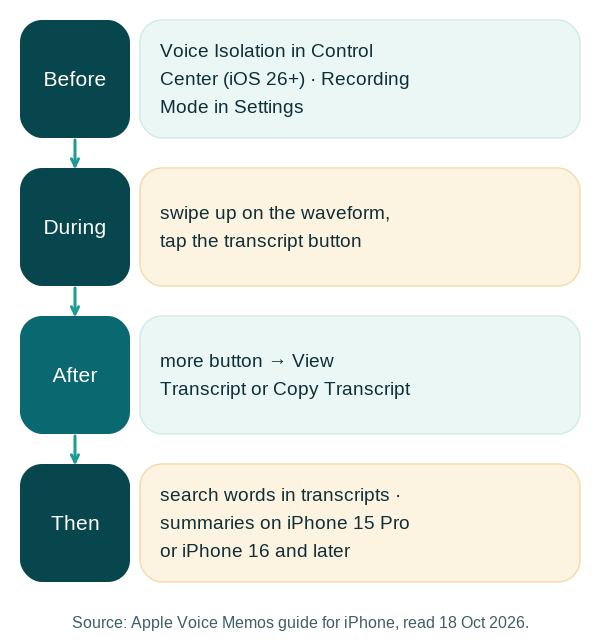
The transcript step needs iPhone 12 or later and a supported language. Apple guides, read 18 October 2026.
On iPhone: view or copy a transcript
- Open Voice Memos (it lives in the Utilities folder unless you moved it) and tap the recording you want.
- Tap the more button, then View Transcript to read and select part of it, or Copy Transcript to take the whole text at once.
- Paste it anywhere: a Mail draft, a note, a document. Apple suggests exactly that.
To see the text live, start a recording, swipe up from the top of the waveform and tap the transcript button. The waveform steps aside and each word is highlighted as it is heard; tap again to go back. Search works across everything you have recorded: the search field in Voice Memos matches words inside transcripts as well as titles, and tapping a matched word moves the playhead to that moment in the audio.
Old recordings are covered too. Apple's guide says a memo made in iOS 17 or earlier is transcribed automatically when you open it, provided it contains speech.
On a Mac: the same transcript, one click away
The Mac edition of Voice Memos mirrors the phone. Select a recording and click the transcript button to read it; select text, Control-click and choose Copy to take it elsewhere. During a recording, the same button swaps the waveform for live text. Apple adds a useful detail: a recording made in macOS 14 or earlier, or one made on a device that can't transcribe, is transcribed automatically when the Mac opens it. With Voice Memos switched on in iCloud, an iPhone 11 recording can therefore get its transcript from a supported Mac.
Who gets transcripts: models, languages, regions
Apple sets three gates for transcription on iPhone, and the table lists what we read on 18 October 2026. If the transcript button never appears, one of these is the reason, not a fault.
| Gate | What Apple requires | If you miss it |
|---|---|---|
| iPhone model | iPhone 12 or later | No transcript on the phone; a supported Mac can transcribe the synced memo |
| Language | English (all variants), Spanish, Portuguese, Italian, French, German, Japanese, Korean, Simplified and Traditional Chinese | No transcript for other languages |
| Region | Not available in all countries or regions | The option may be missing even on a new iPhone |
| Layered memos | Only the first layer is transcribed | The second, sung or spoken layer stays audio only |
| Summaries | Apple Intelligence: iPhone 15 Pro, 15 Pro Max or iPhone 16 and later | Transcripts still work; Writing Tools summaries don't |
Better audio in, cleaner text out: Voice Isolation in Voice Memos
Apple's mic-mode document lists recording apps such as Voice Memos as supported for Voice Isolation from iOS 26. The Voice Memos guide gives the path: open the app, open Control Center, tap the Voice Memos tile and choose Voice Isolation to filter out background sound, or Wide Spectrum to keep it (Apple notes Wide Spectrum isn't on every model). The choice sticks for Voice Memos until you change it, the same per-app memory the mode has in calls.
Apple makes no claim that Voice Isolation improves transcription accuracy, and we haven't measured it. Our reasoning is simpler: a transcriber can only write down what it hears, and a recording that no longer carries the extractor fan or the street gives it less to misread. For a lecture hall or a group discussion, where several voices matter, Isolation can work against you by favouring the closest speaker; Standard or Wide Spectrum keeps the room. The trade-off is laid out in Wide Spectrum vs Voice Isolation.
The other pre-recording setting lives in Settings → Apps → Voice Memos → Recording Mode: Mono, Stereo or Spatial Audio. It changes how playback sounds, not the transcript, so pick it for listening.
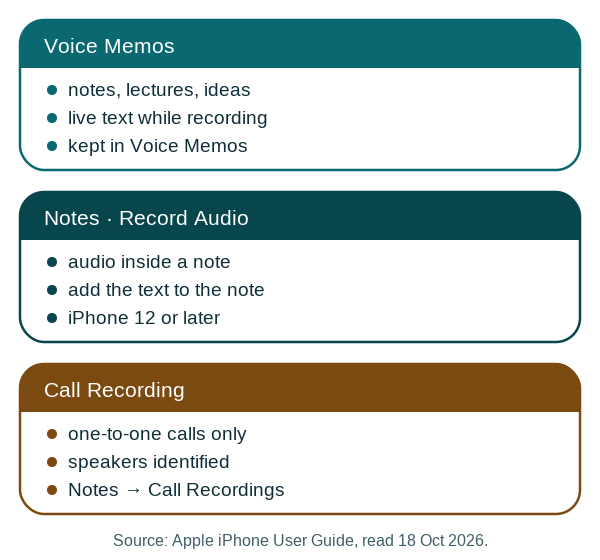
All three need a supported language; call recording also depends on your region. Read 18 October 2026.
When Notes or Call Recording is the better tool
Voice Memos isn't the only transcriber Apple ships. Inside a note in Notes, the Record Audio option shows a live transcript and lets you drop the text straight into the note, which suits meeting notes you will edit afterwards. It shares the iPhone 12 floor and the same language list.
Calls are a third case. A phone call or a one-to-one FaceTime audio call recorded with Apple's Call Recording lands in a Call Recordings folder in Notes, not in Voice Memos, and its transcript names who said what. Both people hear an announcement when recording starts. The details, including what FaceTime video can and can't do, sit in Apple's FaceTime guide under audio call tools.
Edge cases worth knowing
A memo that plays perfectly but shows no transcript is usually a language the system didn't detect, or a region where the feature isn't offered; Apple's Notes guide uses the same explanation for a missing transcript button. Editing is safe: trimming or replacing part of a recording happens in the edit view, and saving as a new recording keeps the original. Deleted memos sit in Recently Deleted for 30 days by default. And if another app starts playing sound while you record, Voice Memos stops recording, which can cut a lecture short; Apple's guide spells that out.
Quick answers
Can iPhone transcribe voice memos automatically?
Yes. On iPhone 12 or later, in a supported language and region, Voice Memos transcribes speech on its own. Open the recording, tap the more button and choose View Transcript.
How do I copy a voice memo transcript?
On iPhone, tap the recording, the more button, then Copy Transcript. On a Mac, open the transcript, select the text, Control-click and choose Copy.
Why don't I see a transcript for my voice memo?
Check the model (iPhone 12 or later), the language (ten languages are listed) and your region. Layered recordings only transcribe their first layer.
Does Voice Isolation work in Voice Memos?
Yes, from iOS 26. Open Control Center while Voice Memos is open, tap its tile and choose Voice Isolation. Wide Spectrum keeps the background instead.
Can a Mac transcribe a memo recorded on an older iPhone?
Apple says the Mac transcribes recordings made on devices that don't support transcription when it opens them, so a synced memo from an older iPhone can get its text there.
Related on the island: macOS mic settings for choosing the right microphone on a Mac, and Voice Isolation not working if the tile won't appear in Control Center.
Sources: Apple: Voice Memos transcription on iPhone; Apple: Voice Memos transcription on Mac; Apple: make a recording in Voice Memos; Apple: record and transcribe audio in Notes.
Using a Mac for calls too? See Krisp for Mac users.