VoiceIsle › Recording FaceTime
The recording file
Can you record a FaceTime call? What each Apple method really captures

Yes, but only one kind of FaceTime call has a proper built-in recorder. A FaceTime audio call with one other person can be recorded from inside the call on iPhone (iOS 18 or later) and on Mac, in the countries where Apple has switched the feature on; both of you hear a spoken notice, and the file lands in the Notes app with a transcript. A FaceTime video call has no record button at all. Screen recording is the usual workaround, and it is the reason so many people end up with a silent or one-sided file.
Below: what each method captures (your voice, the other person's voice, the picture), the exact steps Apple documents, why the far side so often goes missing, and a short consent note. We don't point you at third-party recorder apps or sideloaded tools; everything here ships with the operating system.
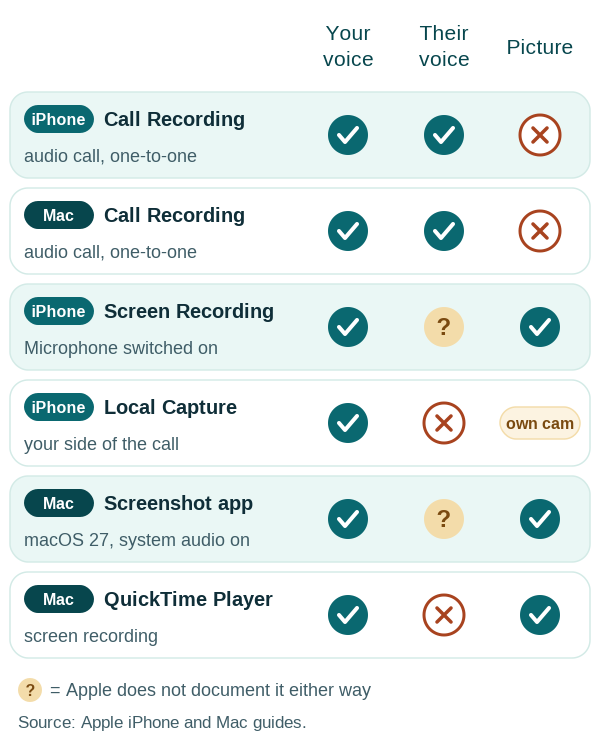
From Apple's iPhone and Mac user guides and support pages. "Not documented" means Apple's pages don't say either way.
The short answer, by device
The table is the whole decision in one place. The first column is the method, the next three say what the resulting file contains, and the last says where it is saved. Nothing in it comes from our own testing; every row is what Apple's documentation states, and where the documentation is silent we say so instead of guessing.
| Method | Your voice | Their voice | Picture | Saved to |
|---|---|---|---|---|
| iPhone: Call Recording (FaceTime audio, one-to-one) | Yes | Yes | No, audio calls only | Notes, Call Recordings folder |
| Mac: Call Recording (FaceTime audio, one-to-one) | Yes | Yes | No, audio calls only | Notes, Call Recordings folder |
| iPhone: Screen Recording with Microphone on | Yes, through the mic | Not documented | Yes, the screen | Photos, Screen Recordings |
| iPhone: Local Capture | Yes, high quality | No | Your camera only | Files, Downloads |
| Mac: Screenshot app, mic plus Include System Audio (macOS 27) | Yes, through the mic | Not documented | Yes, the screen | Desktop by default |
| Mac: QuickTime Player screen recording | Yes, through the mic | No system-audio option | Yes, the screen | Opens in QuickTime |
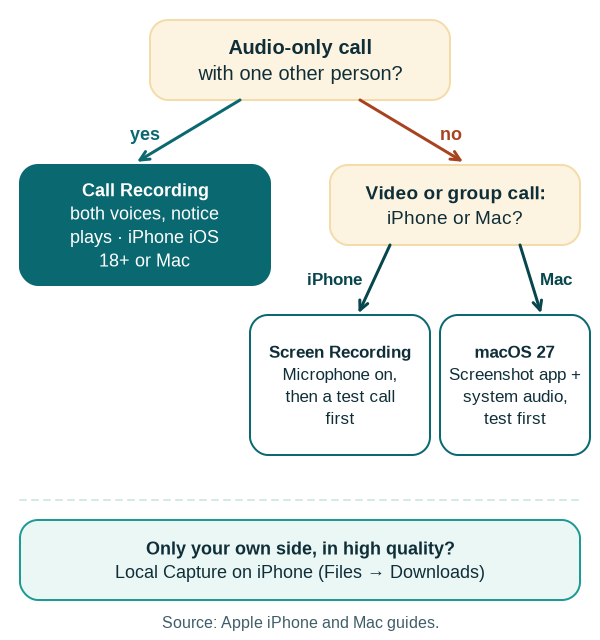
Call type decides the tool; device decides the workaround. Apple guides.
The built-in recorder: FaceTime audio calls only
Apple's FaceTime guide for iPhone describes a Call Recording control that appears during a one-to-one audio call. It is the only method on this page that Apple designed for recording a conversation, and it is the only one that reliably keeps both voices. Apple's call-recording article says recording a phone call or FaceTime audio call works on iPhone starting in iOS 18. On the Mac, the current FaceTime guide documents the same control for audio calls with one other person.
- Start or answer a FaceTime audio call with one person. Apple documents the recorder for one-to-one audio calls only.
- Tap the call-controls button Apple shows during the call, then Call Recording. On a Mac, click the matching button in the call window, then Call Recording.
- Both of you hear an announcement that the call is being recorded. That notice is part of the feature and can't be skipped.
- Stop it, or simply hang up. The audio is saved to a Call Recordings folder in Notes, with a transcript in supported regions and languages.
Two limits matter before you count on it. First, availability is regional. Apple's phone-call version of the same feature lists the countries where call recording is not offered, and the European Union is on that list; the FaceTime page simply sends you to Apple's feature-availability site, so check your region there. Second, the toggle lives in the Phone settings even for FaceTime: Settings → Apps → Phone → Audio Call Recording. It is on by default, so if the option is missing mid-call and your region is supported, look there.
The transcript is a bonus, not a record you should quote without checking. Apple's own note says to verify a transcription's accuracy before relying on it, and that speakers are labelled in the transcript view.
iPhone screen recording: why the other side is often silent
For FaceTime video, people reach for Screen Recording in Control Center. Apple documents two versions. A plain recording captures the screen; to add sound you touch and hold the Screen Recording control, tap Microphone to turn it on, then start. What that microphone hears is your side of the room, which in practice means your own voice.
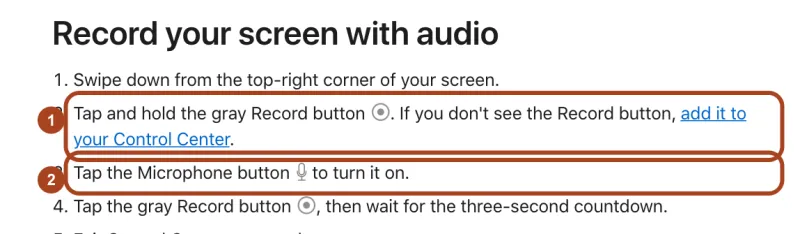
Our screenshot of Apple's public support page 102653 (dated 14 September 2026), captured 3 November 2026; the numbered boxes are ours. Apple documents the microphone, not the other caller's audio.
Whether the other caller's voice is included is where Apple goes quiet. Its iPhone guide carries a short warning that "some apps might not allow you to record their content", without naming which. We haven't tested it ourselves, so we label it "not documented" rather than "no". Before a call that matters, record fifteen seconds of a test call with a friend and play it back.
One practical trap: with the microphone on and the call playing through the loudspeaker, the mic may pick up the other person faintly from the speaker. That is room sound, not a clean capture, and Voice Isolation, which is built to suppress everything that isn't you, works against it. If you are using that trick, the Wide Spectrum vs Voice Isolation trade-off decides how much of the room survives.
Local Capture is a different tool. The iOS 27 iPhone User Guide documents Local Capture as a way to record high-quality audio and video of your own side of a videoconference straight to the Files app, for combining later with other participants' own recordings. Apple notes that Voice Isolation and Wide Spectrum don't apply to a Local Capture file and that you can adjust the sound afterwards. It never contains the other caller, and Apple doesn't list which calling apps support it.
Mac: QuickTime, the Screenshot app and the macOS 27 change
The Mac has two screen recorders, and Apple's support page for them was republished on 14 September 2026 with one line that matters for calls. In the Screenshot app (Shift-Command-5), the Options menu lets you choose a microphone and, in macOS 27 Golden Gate or later, tick Include System Audio. Before macOS 27 that option did not exist in Apple's tool, which is why older guides insist the Mac cannot record what comes out of its speakers without extra software.
QuickTime Player (File → New Screen Recording) still documents only a microphone choice and a monitoring slider. On recent versions, Apple says that menu item may simply hand you over to the Screenshot app's toolbar instead.
Does Include System Audio pick up the other FaceTime caller? Apple's page doesn't say, and it also warns that some apps "might not let you record their windows". Treat it like the iPhone case: a test call first. For a FaceTime audio call, skip the question altogether and use Call Recording, which Apple built for exactly this.
Why recordings come out one-sided
Most failed FaceTime recordings come down to a handful of causes, and each one is visible in the table above once you know where to look.
- The wrong method for the call type. Call Recording appears only on one-to-one audio calls; on a video call or a group call there is nothing to tap.
- Microphone left off. A plain iPhone screen recording has no audio at all until you long-press the control and enable Microphone.
- The app's own protection. Apple warns that some apps block recording of their content; the result can be a file with picture but missing sound.
- Voice Isolation doing its job. If you rely on the loudspeaker bleeding into your mic, isolation removes that bleed as "noise".
The fix for the first three is to change the method; the fix for the last one is a mic-mode change, covered in FaceTime audio settings.
Consent: tell people before you press record
Not legal advice. Recording laws vary between countries and, inside the US, between states; some places require every participant to agree. Apple's own guides tell you to make sure the other person is willing to be recorded, and its Call Recording plays an audible notice to both sides for that reason. A screen recording plays no such notice, so the responsibility for asking is entirely yours. A one-line "mind if I record this so I don't miss anything?" at the start of the call covers the courtesy; if the recording is for work, a journalist interview or anything legal, check the rules where each of you is.
How we checked this
On 3 and 5 November 2026 we re-read Apple's FaceTime audio call tools page for iPhone, the FaceTime audio call features page for Mac, the call-recording article and phone-call guide (for the region list), the iPhone and Mac screen-recording support pages, and the iOS 27 guide page on Local Capture. The table, both charts and the steps repeat what those pages say; where Apple is silent, we write “not documented”.
We have not yet made our own test recording of a FaceTime video call on current iOS, so the question of whether a screen recording keeps the other caller's voice stays open on this page. The screenshot is of Apple's public support page. How the VoiceIsle desk handles facts is on our about page.
Quick answers
Can you screen record FaceTime with sound?
You can record the screen with your microphone on, which captures your voice. Apple doesn't document whether the other caller's audio is included and warns that some apps block recording, so test with a short call first.
Does FaceTime have a built-in call recorder?
For audio calls with one other person, yes: Call Recording on iPhone (iOS 18 or later) and on Mac, where Apple offers it. Both people hear a notice, and the recording is saved in Notes. Video calls have no built-in recorder.
Does the other person know if I record a FaceTime call?
With Call Recording, yes: Apple plays a notice to both participants. A screen recording gives no notice, which is why you should ask first.
Why is Call Recording missing during my FaceTime call?
Check three things: it must be an audio call with exactly one other person, your country or region must be supported, and Settings → Apps → Phone → Audio Call Recording must be on.
Can I record a FaceTime video call on a Mac with both voices?
Apple documents an Include System Audio option for screen recordings in macOS 27, but doesn't say whether FaceTime lets that audio through. Make a short test recording before an important call.
Next on the island: the FaceTime audio controls that shape how you sound in the recording, and macOS mic settings if the Mac is recording the wrong microphone.
Sources: Apple: FaceTime audio call tools on iPhone; Apple: FaceTime audio call features on Mac; Apple: record the screen on iPhone; Apple: record the screen on Mac.
On a Mac and want the call itself cleaner? See Krisp for Mac users.